
Why Avoiding Resume Mistakes Is Essential for Career Success
Your resume is often the first thing a recruiter sees before deciding whether to invite you for an interview. Even if you have excellent qualifications and relevant experience, simple resume mistakes can prevent your application from getting noticed.
Recruiters typically spend only a few seconds scanning each resume. During that short time, they look for clear formatting, relevant skills, measurable achievements, and keywords that match the job description. If your resume contains spelling errors, poor formatting, outdated information, or lacks important details, it may be rejected before anyone learns about your abilities.
Today’s hiring process is also heavily influenced by Applicant Tracking Systems (ATS), which automatically filter resumes before they reach recruiters. A resume that isn’t optimized for ATS may never be seen by a hiring manager.
In this guide, we’ll explore the most common resume mistakes that job seekers make and explain how to avoid them. By fixing these issues, you can improve your resume, increase your interview opportunities, and stand out in today’s competitive job market.
Correcting common resume mistakes increases your chances of getting shortlisted, but interview success depends on how well you communicate your skills. Don’t miss our HR Interview Questions and Best Answers guide to prepare confidently for your next job interview.
Why Resume Mistakes Matter
A small mistake on your resume can create a negative first impression.
Common resume mistakes can:
- Reduce your ATS score.
- Make your resume difficult to read.
- Hide your achievements.
- Show a lack of attention to detail.
- Decrease your interview chances.
- Make recruiters move on to another candidate.
The good news is that most resume mistakes are easy to fix.
1. Using the Same Resume for Every Job
One of the Biggest Resume Mistakes
Many candidates send the same resume to every employer without making any changes.
Recruiters can easily tell when a resume isn’t tailored to the role.
How to Fix It
- Read the job description carefully.
- Include relevant skills.
- Match keywords from the job posting.
- Update your professional summary.
- Highlight the most relevant experience.
A customized resume performs much better than a generic one.
2. Writing a Weak Professional Summary
Your professional summary is one of the first sections recruiters read.
A vague summary like:
“Hardworking individual looking for opportunities.”
doesn’t communicate your value.
Better Example
“Software Developer with three years of experience in React.js and ASP.NET, specializing in scalable web applications and performance optimization.”
Keep your summary short, specific, and relevant.
3. Ignoring ATS Keywords
Resume Mistakes That Prevent Recruiters from Seeing Your Resume
Many companies use ATS software to filter resumes.
If your resume doesn’t contain keywords from the job description, it may never reach a recruiter.
How to Fix It
Use keywords naturally throughout your resume, especially in:
- Professional Summary
- Skills
- Work Experience
- Certifications
Never stuff keywords unnaturally.
4. Listing Responsibilities Instead of Achievements
This is one of the most common resume mistakes.
Instead of writing:
❌ Responsible for developing applications.
Write:
✅ Developed React.js applications that improved page performance by 35%.
Recruiters care about results.
Whenever possible, include numbers.
Examples:
- Increased productivity by 20%.
- Reduced bugs by 40%.
- Improved response time by 30%.
Achievements demonstrate your impact.
5. Including Spelling and Grammar Errors
Nothing creates a worse impression than careless mistakes.
Examples:
- Incorrect spelling
- Grammar mistakes
- Missing punctuation
- Inconsistent capitalization
How to Fix It
- Proofread multiple times.
- Use grammar-checking tools.
- Ask someone else to review your resume.
- Read it aloud before sending.
Attention to detail reflects professionalism.
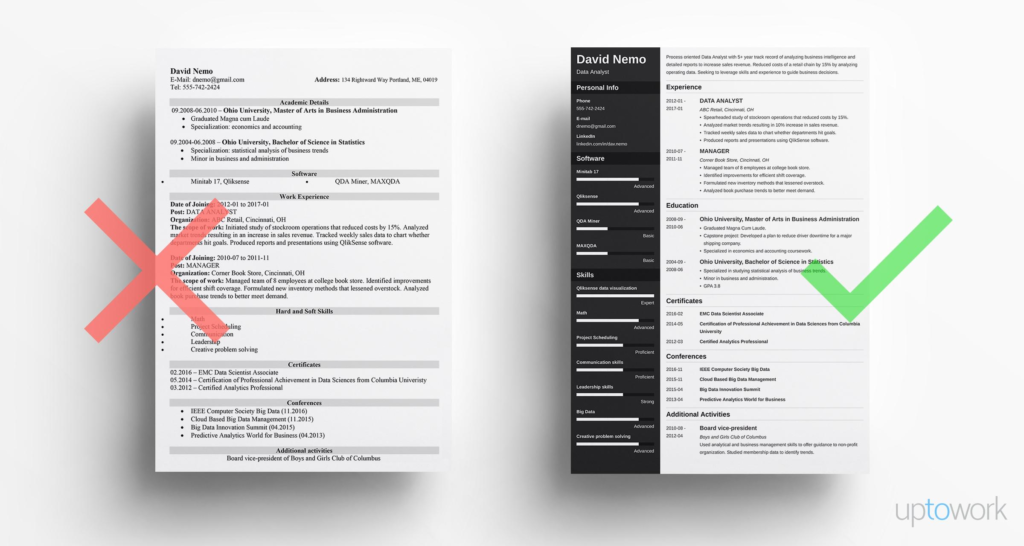
6. Using Poor Formatting
Poor Formatting Is One of the Most Avoidable Resume Mistakes
A cluttered resume is difficult to read.
Avoid:
- Multiple fonts.
- Bright colors.
- Large paragraphs.
- Too many design elements.
- Inconsistent spacing.
Instead:
- Use one professional font.
- Add white space.
- Use bullet points.
- Keep headings consistent.
- Make information easy to scan.
Simple resumes are usually the most effective.
7. Including Irrelevant Information
Recruiters don’t need to know everything about you.
Avoid adding:
- Hobbies unrelated to the job.
- Outdated skills.
- Personal information like marital status or religion.
- Irrelevant work experience.
Only include information that supports your application.
Every section should add value.
8. Using an Unprofessional Email Address
Small Resume Mistakes Can Leave a Bad Impression
Email addresses like:
appear unprofessional.
Instead, use:
✅ firstname.lastname@email.com
or
A professional email address helps build credibility.
Resume Improvement Tips
Before applying for any job:
✔ Update your resume regularly.
✔ Add recent achievements.
✔ Remove outdated information.
✔ Keep formatting clean.
✔ Tailor your resume to each role.
✔ Include measurable results.
✔ Optimize for ATS.
These small improvements can make a significant difference.
9. Using an Outdated Resume
One of the Most Overlooked Resume Mistakes
Many professionals continue using the same resume for years without updating it.
An outdated resume may not include:
- Recent work experience
- New certifications
- Latest technical skills
- Promotions
- Major achievements
- Current contact information
How to Fix It
Update your resume every few months, even if you’re not actively looking for a new job. This ensures you’re always prepared for new opportunities.
10. Resume Mistakes: Making Your Resume Too Long
Recruiters don’t have time to read a lengthy resume.
A resume filled with unnecessary details is one of the most common resume mistakes.
Best Practice
- Freshers: Keep your resume to one page.
- Experienced professionals: Limit it to two pages.
Focus on quality rather than quantity.
11. Not Including Relevant Skills
Resume Mistakes That Reduce Your ATS Score
Your skills section should match the job requirements.
For example, if you’re applying for a Software Developer role, include relevant skills such as:
- React.js
- ASP.NET Core
- C#
- SQL Server
- Git
- REST APIs
Also include workplace skills like:
- Communication
- Problem-solving
- Teamwork
- Time management
- Leadership
Review the job description and include the most relevant skills naturally.
12. Resume Mistakes: Using Weak Action Words
The words you choose can influence how recruiters perceive your experience.
Avoid phrases like:
- Responsible for
- Worked on
- Helped with
- Assisted in
Instead, use strong action verbs:
- Developed
- Designed
- Led
- Implemented
- Improved
- Optimized
- Automated
- Increased
- Reduced
- Delivered
Strong action verbs make your achievements more impactful.
13. Forgetting to Include Measurable Results
Resume Mistakes That Make Your Experience Less Impressive
Recruiters love numbers because they show real impact.
Instead of writing:
❌ Improved application performance.
Write:
✅ Improved application performance by 40%, reducing page load time from 5 seconds to 3 seconds.
Instead of:
❌ Worked with clients.
Write:
✅ Managed relationships with 15+ enterprise clients, maintaining a 95% customer satisfaction rate.
Whenever possible, quantify your achievements.
14. Adding Too Many Graphics and Design Elements
A visually attractive resume isn’t always an effective resume.
Many ATS systems struggle to read:
- Icons
- Charts
- Tables
- Text boxes
- Complex layouts
- Multiple columns
Best Practice
Keep your design clean and simple.
Use:
- Standard headings
- Bullet points
- Professional fonts
- Consistent spacing
A simple resume is easier for both ATS software and recruiters to read.
15. Sending Your Resume Without Reviewing It
The Final Resume Mistakes to Avoid
Never send your resume immediately after finishing it.
Always review it carefully.
Final Resume Checklist
Before clicking Apply, make sure:
- Your contact information is correct.
- There are no spelling or grammar mistakes.
- Dates are accurate.
- Formatting is consistent.
- The resume matches the job description.
- Keywords are included naturally.
- Achievements are measurable.
- The file name is professional (for example, John_Smith_Resume.pdf).
A five-minute review can prevent costly mistakes.
Resume Do’s and Don’ts
Do’s
- Customize your resume for each application.
- Keep formatting clean and professional.
- Use measurable achievements.
- Include relevant keywords.
- Highlight your strongest skills.
- Proofread carefully.
- Update your resume regularly.
- Use action verbs.
Don’ts
- Use the same resume everywhere.
- Include unnecessary personal details.
- Write long paragraphs.
- Add irrelevant work experience.
- Use unprofessional email addresses.
- Overuse graphics or colors.
- Exaggerate your achievements.
- Submit without reviewing.
ATS Resume Checklist
To improve your chances of passing Applicant Tracking Systems:
✅ Use standard section headings.
✅ Match keywords with the job description.
✅ Use simple formatting.
✅ Avoid tables and graphics.
✅ Save your resume as PDF unless another format is requested.
✅ Include measurable achievements.
✅ Use professional fonts such as Arial or Calibri.
✅ Keep the layout clean and readable.
An ATS-friendly resume increases the likelihood of reaching a recruiter.
Resume mistakes: Frequently Asked Questions
What are the most common resume mistakes?
The most common resume mistakes include using the same resume for every job, spelling errors, poor formatting, ignoring ATS keywords, listing responsibilities instead of achievements, and including irrelevant information.
How can I make my resume ATS-friendly?
Use simple formatting, include relevant keywords from the job description, avoid graphics and tables, and organize your resume with standard headings.
Should I customize my resume for every job?
Yes. Tailoring your resume to each role improves your chances of passing ATS screening and getting shortlisted by recruiters.
How long should my resume be?
Freshers should ideally keep their resume to one page, while experienced professionals can use up to two pages if necessary.
What is the biggest mistake job seekers make?
One of the biggest resume mistakes is submitting a generic resume without customizing it for the specific job role.
Final Thoughts
Avoiding common resume mistakes can significantly improve your chances of getting interview calls and moving forward in the hiring process. Your resume is more than just a summary of your experience—it’s your personal marketing document. A well-structured, ATS-friendly resume that highlights your skills, achievements, and measurable results helps recruiters quickly understand the value you can bring to their organization.
Remember, even small improvements can make a big difference. Keep your resume updated, tailor it for every application, proofread it carefully, and focus on showcasing your accomplishments rather than simply listing responsibilities. These practices will help you stand out in today’s competitive job market.
Your resume may only get a few seconds of attention, so make every word count. By avoiding the resume mistakes covered in this guide, you’ll be better prepared to impress recruiters and secure more interview opportunities.
At Corporate Chugli, we share practical career advice, interview preparation tips, workplace success strategies, and professional development insights to help you grow in your career.
Remember: A great resume doesn’t just tell recruiters what you’ve done—it convinces them why they should interview you.